

Foxit® PDF IFilter - Overview
Search for PDF Documents with the Fastest PDF IFilter on the Market
Foxit's PDF IFilter provides super-fast indexing allowing users to index a large amount of PDF documents and then quickly find desired documents by specifying search criteria. Built on Microsoft®'s IFilter indexing interface, Foxit PDF IFilter extracts data from PDF documents and returns the index results to search engine software. It goes beyond Adobe® and indexes PDF content, titles, subjects, authors, keywords, PDF portfolios, annotations, text and data from forms (both standard PDF and XFA forms), bookmarks, attachments, create time/date, number of pages, and the names of the creating applications. This results in more precise search results. PDF documents can be rapidly searched on the desktop, a corporate server, or via the Web through keywords. These PDF documents can be files, email attachments, or database records.
Unique Multi-Core Support Delivers Fastest Search Available
PDF IFilter is designed to unleash the computing power of today's advanced server architectures to perform crawls at blazing speeds. Unlike other IFilter products, it takes full advantage of today's multi-core server architectures, is thread safe, and is available for both 32-bit and 64-bit operating systems - making it the absolutely fastest PDF IFilter available.
Reduces Customers Total Cost of Ownership
PDF IFilter's superior performance and scalability reduce customers' total cost of ownership through decreased costs of server hardware, data center floor space, power and cooling, and administration.
Compatible with Your Existing Environment
Foxit PDF IFilter supports multiple languages, including Asian languages and right-to-left languages, with ease. PDF IFilter supports indexing of ISO 32000-1 (which based upon PDF 1.7), PDF-A, and Adobe PDF files.
Free Trial Download
Evaluate Foxit's PDF IFilter with a Free Trial Download and discover how quickly and easily you can search for PDF documents with the industry's best PDF IFilter product.
* License-based access, not ownership
Plug-In for Search Engines Based on Microsoft's IFilter Index Interface
Foxit PDF IFilter is a robust implementation of Microsoft®'s IFilter indexing interface. It works with all search and retrieval products supporting the IFilter interface (for example, SharePoint® and SQL Server®).
Such products use format-specific filter programs (called IFilters) for particular file formats (for example, HTML). Foxit PDF IFilter is such a program, aimed at PDF documents. The user interface for searching the documents may be Windows Explorer,
a web browser, database frontend, query script, or a custom application.
Foxit PDF IFilter acts as a plug-in for full-text search engines. A search engine usually works in two steps:
- The search engine goes through a designated place (a file folder or a database), indexes all documents or newly modified documents (including PDF documents), and then stores indexing results in an internal database.
- Users specify keywords they would like to search, the search engine looks up the indexing results in the internal database, and then responding to users with all the documents that contain the specified keywords.
During step 1, the search engine itself doesn't understand the format of a PDF document. Therefore, it looks in the Windows registry for an appropriate PDF IFilter and finds the Foxit PDF IFilter. Since the PDF IFilter understands PDF format, it filters out embedded formatting,
extracts text from the documents, and then returns the text back to the search engine.
Foxit PDF IFilter functions in the following search engine environments:
- Microsoft SharePoint Server: SharePoint Server 2007, SharePoint Server 2010, SharePoint Server 2013, SharePoint Server 2016, SharePoint Server 2019
- Microsoft Exchange Server: Exchange Server 2007, Exchange Server 2010
- Microsoft SQL Server: SQL Server 2008, SQL Server 2010, SQL Server 2014, SQL Server 2016, SQL Server 2017, SQL Server 2019
As an alternative to interactive searches, queries can also be submitted programmatically without any user interface on the following Windows operating systems:
- Windows 10
- Windows 8
- Windows 7
- Windows Server 2012
- Windows Server 2008
- Windows Server 2003
- Windows Server 2016
- Windows Server 2019
Optimized index capability
- Super-fast indexing allows users to search more documents in less time. Unique memory management supports multi-threading and takes full use of multi-core/multi-CPU servers.
Support indexing of ISO 32000 PDF, (PDF 1.7), PDF-A, PDF portfolios, and Adobe® PDF files.
- Support the PDF documents that you currently have.
Index PDF Documents
- Find PDF documents by indexing PDFs' content.
Index PDF Forms
- Find standard PDF and XFA forms by indexing PDF form text and data.
Index PDF attributes
- Find PDF documents by indexing PDFs' titles, authors, subjects, keywords, etc.
Index PDF annotations, bookmarks and attachments
- Find PDF documents by indexing annotation, bookmark and attachment information.
Configuration settings and logging support
- Enhance the user experience and notify developers should an error occur.
A 64-bit version
- Increased performance - takes advantage of leading server architectures.
Multi-language support - including right-to-left languages
- Support your worldwide user base.
Compatible with Microsoft SharePoint Server, Microsoft Exchange Server, SQL Server, Windows Indexing Server
- Compatible with your existing environment.
Foxit PDF IFilter - Server Test, with SharePoint 2010
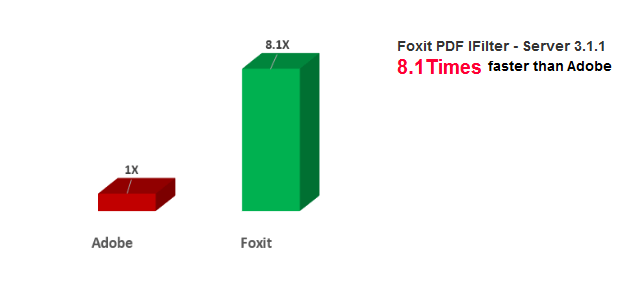
Key test results include:
- Data Set Crawl Time
- Foxit PDF IFilter - Server 3.1.1 finished the full crawl in just 32 minutes
- 8.1x faster than Adobe PDF IFilter
- AVG. Files per second
- 5.54 files per second on SharePoint 2010 (64-bit)
- 8.15x better than Adobe PDF IFilter
Note: Because Foxit PDF IFilter supports more features, it need more time to complete retrieval.
- Feature Comparison
| Feature Product | Foxit PDF IFilter 3.1.1 | PDFlib TET PDF IFilter 5.0 | Adobe IFilter 11.0 | |
| Extract PDF Text | √ | √ | √ | |
| Extract PDF Attributes | √ | √ | √ | |
| Extract PDF Bookmark | √ | X | X | |
| Extract PDF Annotation | √ | X | Only callout and typewriter | |
| Extract PDF Attachments | √ | √ | √ | |
| Extract Form | Tooltip | √ | X | X |
| Name | √ | X | X | |
| Label | √ | X | X | |
| Item List | √ | X | All items in the item list of List Box and part of items in the item list of Combo Box | |
| Default Value | √ | X | Only text field | |
| Extract XFA/XML Form | Dynamic XFA | √ | X | X |
| Static XFA | √ | √ | √ | |
| Extract PDF Portofolio | Portfolio Attributes | √ | √ | X |
| PDF Content | √ | √ | X | |
| Bookmark | √ | X | X | |
| Annotation | √ | X | X | |
| Extract Right-to-Left Text | √ | √ | √ | |
Foxit PDF IFilter comes in a 32-bit and 64-bit Windows® version. Select the version that matches your system requirements.
Sample Installation - Microsoft® Office® SharePoint Server®
To install Foxit PDF IFilter with Microsoft Office SharePoint Server 2010, please follow these simple steps:
Please note that Microsoft Office SharePoint Server 2010 has been installed successfully.
- Download Foxit PDF IFilter from Foxit Website onto the machine where you wish to install it.
- Stop the IIS Admin service: Start > Settings > Control Panel > Administrator Tools > Services > IIS Admin Service > Stop. Close window.
- Run the Foxit PDF IFilter Setup program to install the IFilter on the server.
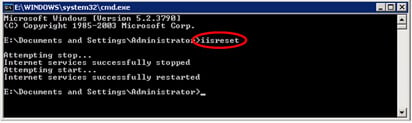
- Perform an iisreset:
- Click Start > Run > type "cmd" in the Open line > click OK > type "iisreset" at the command prompt > hit Enter.
- Close the window.
- Click Start > Run > type "cmd" in the Open line > click OK > type "iisreset" at the command prompt > hit Enter.
- Stop and start the SharePoint Search Service by running the following commands:
- net stop spsearch4
- net start spsearch4
- net stop osearch14
- net start osearch14
Microsoft Office SharePoint Server 2010 can now index PDF files.
Note:
For the installation instructions with other search engines, please refer to their respective user manuals (https://www.foxit.com/support/usermanuals/) for details.
Additional Notes:
Foxit PDF IFilter does not have a user interface. Since Foxit PDF IFilter acts as a plug-in for various search engines, it is the search engine that is responsible for interpreting the returned text and then presenting the information to the user.
The installation package will unzip a language file called fpdfcjk.bin into the installation folder. This file will help you index PDF documents containing Chinese/Japanese/Korean characters.
For existing Foxit PDF IFilter 2.X customers looking to upgrade, new features in PDF IFilter 3.X include:
- Indexing of form text and data from standard PDF and XFA forms.
- Indexing of PDF portfolios.
- Indexing of PDF documents in languages that are right-to-left.
| Price ( US$ ) | |
|---|---|
| PDF IFilter - Production | $1,999.00 per server |
| PDF IFilter - Test/Development/Fail-over | $999.50 per server |
| Upgrade from PDF IFilter 1.X to PDF IFilter 3.X(Production Server) | $1,399.30 per server |
| Upgrade from PDF IFilter 2.X to PDF IFilter 3.X(Production Server) | $999.50 per server |
| Upgrade from PDF IFilter 1.X to PDF IFilter 3.X(Test/Development/Fail-over) | $699.65 per server |
| Upgrade from PDF IFilter 2.X to PDF IFilter 3.X (Test/Development/Fail-over) | $499.75 per server |